

About Mobali Solutions. We build telephony integrations for CRM platforms. Over the years we’ve delivered many phone integrations into Dynamics 365 CRM — including Genesys Cloud and Enreach Voice, among others — and we’ve built telephony integrations for Pipedrive and HubSpot as well. This post distills that experience into a compact, working reference: a Twilio browser softphone wired into Dynamics 365 through the Channel Integration Framework.
Link to Github repo: https://github.com/mobali/twilio-d365-integration
Contact-center and inside-sales agents spend their day toggling between two windows: a phone (or a physical handset) and a CRM. A customer calls, the agent reads the number off a screen, types it into a search box, finds the account, and starts talking — all before the greeting is done. Outbound is the mirror image: find the record, read the number, dial it by hand. Every one of those manual hops is a chance to mis-key a digit, forget to log the call, or lose the context that was on screen a moment ago.
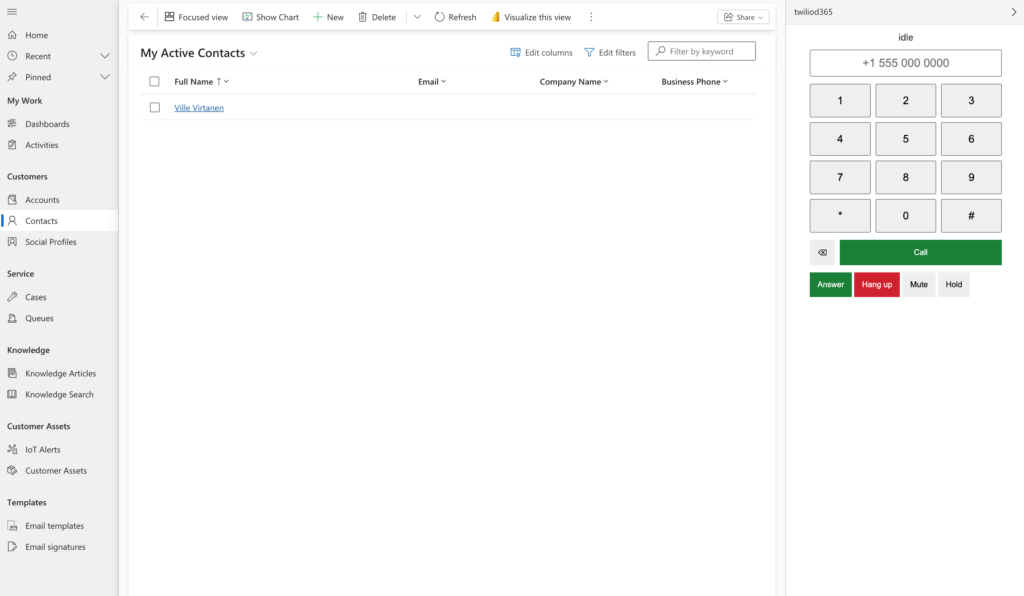
This post walks through a working integration that removes those hops. We build a browser softphone on top of the Twilio Voice SDK, and we make the same build light up inside Dynamics 365 through the Channel Integration Framework (CIF): inbound calls pop the matching contact, finished calls are logged as Phone Call activities, and click-to-dial on a record places the call. Crucially, the softphone also runs perfectly well on its own — open it in a browser tab and it’s just a phone. There is no separate “D365 build”; the app detects its host at runtime.
The code is organized as three npm workspaces, and everything below is grounded in the real source. Where the implementation makes a deliberate simplification (hold, for example) I call it out rather than paper over it.
1. Architecture overview
Three packages, each with one job:
server/— a small Node/Express backend. It mints short-lived Twilio Voice access tokens and answers Twilio’s/voicewebhook with TwiML. This is the only component that touches your Twilio account credentials.webphone/— the browser softphone (Vite + TypeScript). It fetches a token from the server, registers a TwilioDevice, and renders a dialpad and call controls. It contains the CIF adapters but has no build-time knowledge of whether D365 is present.d365/— the Dynamics-side glue: web resources (form scripts, click-to-dial, an optional iframe host) and the solution/provider setup docs.
The key design decision is the standalone-vs-CIF duality. The webphone never imports a D365-specific entry point. On startup it inspects window.Microsoft.CIFramework and picks an adapter: a real CIF 1.0 or 2.0 adapter when hosted in Dynamics, or a no-op adapter when running alone. The telephony code and the UI don’t know or care which one they got — they talk to a CifAdapter interface.
                          POST /token  (JWT access token)
   ┌───────────────┐  ◀───────────────────────────────  ┌──────────────┐
   │   webphone    │                                     │   server/    │
   │ (browser)     │  ────────────────────────────▶    │ Express      │
   │               │       (token request)               │              │
   │  TwilioDevice │                                     │  createVoice │
   │  EventBus     │                                     │  Token       │
   │  CifAdapter   │                                     │  buildVoice  │
   └───────┬───────┘                                     │  Response    │
           │  @twilio/voice-sdk                          └──────▲───────┘
           │  (media + signaling)                               │ POST /voice
           ▼                                                    │ (TwiML)
     ┌───────────┐   webhook when a call starts                 │
     │  Twilio    │  ──────────────────────────────────────────┘
     │  edge      │
     └───────────┘

   Host detection (runtime, in the browser):

     window.Microsoft.CIFramework?
       ├─ absent .................. NoopAdapter  (standalone phone)
       ├─ present ................. Cif1Adapter  (single-session, default)
       └─ present + ?cifversion=2   Cif2Adapter  (multisession, opt-in)
The rest of the post follows the data flow: backend first, then the standalone phone, then the D365 layer on top.
2. The token / TwiML backend
The browser must never hold your Twilio Account SID and Auth Token — anything shipped to the client is readable by the client. Instead the backend mints a short-lived access token (a JWT) that authorizes exactly one browser client for one hour, and nothing else.
Two things are worth understanding before the code.
Why an API Key, not the Auth Token. Twilio access tokens are signed with an API Key SID/Secret pair, not with your account’s Auth Token. An API key can be rotated or revoked independently of the account, so a leaked signing key is a contained incident. Config reflects this — the server requires the API key pair and refuses to start without it:
// server/src/config.ts
const REQUIRED = [
  "TWILIO_ACCOUNT_SID", "TWILIO_API_KEY_SID", "TWILIO_API_KEY_SECRET",
  "TWILIO_TWIML_APP_SID", "TWILIO_CALLER_ID",
] as const;

export function loadConfig(env: NodeJS.ProcessEnv): AppConfig {
  const missing = REQUIRED.filter((k) => !env[k]);
  if (missing.length > 0) {
    throw new Error(`Missing required environment variables: ${missing.join(", ")}`);
  }
  // ...builds a validated AppConfig
}
Why a TwiML App. The token grants the browser the right to place outbound calls through a specific TwiML App. A TwiML App is just a named pointer to a Voice Request URL. When the browser SDK places a call, Twilio looks up that app, calls its Voice URL (our /voice endpoint), and does whatever TwiML comes back. This indirection is what lets the server decide how each call is dialed, even though the browser initiated it.
Minting the token:
// server/src/token.ts
const { AccessToken } = twilio.jwt;
const { VoiceGrant } = AccessToken;

export function createVoiceToken(config: AppConfig, identity?: string): string {
  const who = identity ?? config.agentIdentity;
  const token = new AccessToken(
    config.accountSid,
    config.apiKeySid,
    config.apiKeySecret,
    { identity: who, ttl: 3600 },
  );
  token.addGrant(
    new VoiceGrant({
      outgoingApplicationSid: config.twimlAppSid,
      incomingAllow: true,
    }),
  );
  return token.toJwt();
}
The VoiceGrant says two things: outbound calls route through outgoingApplicationSid (our TwiML App), and incomingAllow: true lets Twilio ring this browser client by its identity. That’s the whole basis for browser-to-PSTN and PSTN-to-browser calling.
When a call actually starts, Twilio POSTs to /voice and we return TwiML. Here is a gotcha that cost us a real debugging session: both outbound (browser → PSTN) and inbound (PSTN → your Twilio number) calls hit the same TwiML App Voice URL, so this one handler has to tell them apart itself.
The bug we hit first. The obvious implementation is “if there is a To, dial it.” It works for outbound and silently breaks inbound: on an inbound call To is your own Twilio number, so “dial To” makes Twilio call itself and the agent’s browser never rings. The reliable discriminator is From — a browser-SDK call arrives with From="client:<identity>" (dial the To it carries), while an inbound PSTN call arrives with From=<caller> and must instead ring the agent’s client:
// server/src/twiml.ts
export function buildVoiceResponse(config: AppConfig, params: VoiceParams): string {
  const response = new VoiceResponse();
  const to = params.To?.trim();
  const isOutboundFromClient = (params.From?.trim() ?? "").startsWith("client:");

  if (isOutboundFromClient && to) {
    const dial = response.dial({ callerId: config.callerId });
    if (isPhoneNumber(to)) dial.number(to);
    else dial.client(to);
  } else {
    const dial = response.dial();
    dial.client(config.agentIdentity);
  }
  return response.toString();
}
Two branches fall out:
- Outbound (
From="client:…"): theTowe passed from the browser is the real target. A phone number →<Dial><Number>it withTWILIO_CALLER_IDas the caller ID (isPhoneNumberis a/^[+\d]/test on the trimmed target); anything else →<Dial><Client>for browser-to-browser. - Inbound (anything else): we must not dial
To— that would be dialing our own Twilio number, and the inbound call never connects. We ring the agent’s browser with<Dial><Client>agentIdentity</Client></Dial>.
The Express layer wires these into routes. Note that /voice reads form-encoded fields (Twilio posts application/x-www-form-urlencoded), and /token reads JSON:
// server/src/routes.ts
app.post("/token", (req, res) => {
  const identity = typeof req.body?.identity === "string" ? req.body.identity : undefined;
  const token = createVoiceToken(config, identity);
  res.json({ token, identity: identity ?? config.agentIdentity });
});

app.post("/voice", (req, res) => {
  const xml = buildVoiceResponse(config, {
    To: req.body?.To, From: req.body?.From, Direction: req.body?.Direction,
  });
  res.type("text/xml").send(xml);
});
There’s also a permissive CORS shim (so the Vite dev server can call /token) and a GET /health. See server/src/routes.ts for the full file.
3. The standalone softphone
The webphone is deliberately decoupled: a typed event bus sits between the Twilio device, the UI, and (later) the CIF layer, so none of them import each other directly.
The bus is a tiny typed pub/sub. The event map is the contract:
// webphone/src/events.ts
export type CallStatus = "idle" | "connecting" | "ringing" | "in-call" | "on-hold";

export interface PhoneEventMap {
  statusChanged: { status: CallStatus };
  incoming: { from: string };
  connected: { direction: "inbound" | "outbound"; peer: string };
  disconnected: { direction: "inbound" | "outbound"; peer: string; durationSec: number };
  error: { message: string };
}
EventBus.on/off/emit are generic over keyof PhoneEventMap, so a handler for "disconnected" is statically known to receive { direction, peer, durationSec } and nothing else.
TwilioDevice wraps the Twilio Voice SDK and translates its callbacks into those bus events. Initialization fetches a token, constructs the Device, wires callbacks, and registers:
// webphone/src/device.ts
async init(): Promise {
  const token = await this.fetchToken();
  this.device = new Device(token);
  this.device.on("incoming", (call: Call) => this.onIncoming(call));
  this.device.on("error", (e: { message?: string }) =>
    this.bus.emit("error", { message: e?.message ?? "Device error" }));
  this.device.on("tokenWillExpire", async () => {
    try {
      const fresh = await this.fetchToken();
      this.device?.updateToken(fresh);
    } catch (e) {
      this.bus.emit("error", { message: e instanceof Error ? e.message : "Token refresh failed" });
    }
  });
  await this.device.register();
  this.bus.emit("statusChanged", { status: "idle" });
}
The token refresh is itself wrapped: if fetchToken throws (network blip, server rejects the request), the failure surfaces as an error event on the bus instead of an unhandled rejection — the device keeps running on its current token rather than crashing the call.
Placing a call is device.connect({ params: { To: target } }) — those params are exactly the form fields Twilio later posts to /voice, which is how the browser’s target reaches our TwiML builder. Each call is “attached” so its lifecycle drives the bus:
// webphone/src/device.ts
private attachCall(call: Call, peer: string): void {
  this.call = call;
  call.on("accept", () => {
    this.startedAt = Date.now();
    this.bus.emit("statusChanged", { status: "in-call" });
    this.bus.emit("connected", { direction: this.direction, peer });
  });
  call.on("disconnect", () => {
    const durationSec = this.startedAt ? Math.round((Date.now() - this.startedAt) / 1000) : 0;
    this.bus.emit("disconnected", { direction: this.direction, peer, durationSec });
    this.bus.emit("statusChanged", { status: "idle" });
    this.reset();
  });
}
Mute and hold
Mute is straightforward: it mutes the transport. Hold, in this build, is realized as a persistent mute plus a distinct status — not a true carrier-side hold. The device keeps two independent booleans and derives the actual transport state from both:
// webphone/src/device.ts
setMuted(muted: boolean): void {
  this.muted = muted;
  this.applyMute();
}

/** Reflects the user's mute toggle. Hold mutes the transport independently. */
isMuted(): boolean {
  return this.muted;
}

/** Hold is realized as a persistent mute with a distinct status (documented). */
setHold(hold: boolean): void {
  this.held = hold;
  this.applyMute();
  this.bus.emit("statusChanged", { status: hold ? "on-hold" : "in-call" });
}

/** Transport is muted when the user muted OR the call is on hold. */
private applyMute(): void {
  this.call?.mute(this.muted || this.held);
}
Note the split responsibility: isMuted() returns the user’s mute toggle, while applyMute() computes this.muted || this.held for the wire. So hold silences the transport but doesn’t flip the user-facing mute state. This is a deliberate simplification — the wrap-up covers how you’d swap in a real TwiML <Enqueue>-based hold.
The controller and UI
PhoneController mediates UI intents and the device, holding its own mute/hold toggle state:
// webphone/src/controller.ts
toggleMute(): void {
  this.muted = !this.muted;
  this.device.setMuted(this.muted);
}
toggleHold(): void {
  this.held = !this.held;
  this.device.setHold(this.held);
}
The UI is plain DOM. renderDialpad builds a keypad, a number field, and a Call button; renderCallControls wires Answer/Hangup/Mute/Hold to the controller; renderStatus subscribes to the bus and shows a live call timer. None of them know Twilio exists — they only touch the controller and the bus.
Everything is assembled in main.ts — and the exact shape here is load-bearing for the D365 case. The UI renders immediately, but the controller is created only after the CIF host is detected, so the UI drives it through a lazy indirection (clicks before it is ready are harmless no-ops):
// webphone/src/main.ts
const app = document.getElementById("app")!;
const bus = new EventBus();
const tokenUrl = import.meta.env.VITE_TOKEN_ENDPOINT ?? "http://localhost:3001/token";

const device = new TwilioDevice(bus, { tokenUrl });

// The controller is created only after the CIF host is detected (below), so
// the UI drives it through this indirection.
let controller: PhoneController | undefined;
const actions: CallActions = {
  answer: () => controller?.answer(),
  hangup: () => controller?.hangup(),
  toggleMute: () => controller?.toggleMute(),
  toggleHold: () => controller?.toggleHold(),
};

renderStatus(app, bus);
renderDialpad(app, (n) => void controller?.dial(n));
renderCallControls(app, actions);

// Wait for D365 to inject Microsoft.CIFramework before choosing the adapter
// (section 4); standalone falls through after a timeout.
void (async () => {
  await waitForCifFramework(window);
  const cif = createCifAdapter(window);
  controller = new PhoneController(bus, device, cif);
  await controller.start();
})().catch((e) =>
  bus.emit("error", { message: e instanceof Error ? e.message : String(e) }));
Running it alone: start the server (npm run dev --workspace server), then npm run dev --workspace webphone, and open http://localhost:5173. Dial an E.164 number or another client identity and call. Because createCifAdapter returns a NoopAdapter when D365 is absent, the phone is fully functional on its own — no Dynamics required.
4. Adding D365 CIF
Now the interesting part: making the same app integrate with Dynamics when it happens to be hosted there. But before any adapter code can run, two real-world hurdles have to be cleared that the tutorials gloss over: getting the CIF library loaded at all, and waiting for it to be ready.
Loading the CIF client library
This was the single biggest surprise of the whole project. In the tutorial version of CIF, Dynamics injects Microsoft.CIFramework into the panel iframe for you. That injection only happens when the iframe is served from the same origin as Dynamics. Our softphone is hosted on its own static host — a different origin — so D365 injects nothing, detection sees nothing, and we silently fall back to the NoopAdapter: no screen pop, no logging, no click-to-dial, and no error anywhere to tell you why.
The fix is documented but easy to miss: the widget has to load msdyn_ciLibrary.js from the D365 org itself, which then bridges to the parent window and exposes Microsoft.CIFramework inside our iframe. So index.html ships a tiny inline loader that auto-detects the framing org (from ancestorOrigins, falling back to document.referrer, overridable with ?crmurl=) and injects the library with the data-crmurl / data-cifid="CIFMainLibrary" attributes CIF expects. It only runs when actually framed, so the standalone phone is untouched:
<!-- webphone/index.html -->
<script>
  (function () {
    function originOf(u) { try { return new URL(u).origin; } catch (e) { return ""; } }
    var params = new URLSearchParams(window.location.search);
    var crmUrl = params.get("crmurl") || "";
    var lib = params.get("ucilib") || "";
    if (!crmUrl && !lib) {
      var ao = window.location.ancestorOrigins;
      if (ao && ao.length) crmUrl = ao[0];
      else if (document.referrer) crmUrl = originOf(document.referrer);
    }
    if (!lib && crmUrl) lib = crmUrl.replace(/\/+$/, "") + "/webresources/Widget/msdyn_ciLibrary.js";
    if (!crmUrl && lib) crmUrl = originOf(lib);
    if (lib && crmUrl && window.self !== window.top) {
      var s = document.createElement("script");
      s.type = "text/javascript";
      s.src = lib;
      s.setAttribute("data-crmurl", crmUrl);
      s.setAttribute("data-cifid", "CIFMainLibrary");
      document.head.appendChild(s);
    }
  })();
</script>
The symptom when this is missing is maddening precisely because nothing errors: the panel renders, the phone works standalone, and every CIF feature just quietly no-ops.
Waiting for CIF to be ready (the CIFInitDone event)
That library loads asynchronously, so Microsoft.CIFramework is usually not present at the instant the app boots. Pick the adapter synchronously on startup (as an earlier version did) and you race the loader and lose — you get the NoopAdapter again. The library raises a documented CIFInitDone event on window once its APIs are ready, so we wait on that, with a poll-and-timeout fallback that also covers the race where the event fires before we subscribe and provides the standalone exit (no CIF host ever appears):
// webphone/src/cif/detect.ts
export function waitForCifFramework(
  w: Window,
  timeoutMs = 8000,
  intervalMs = 250,
): Promise<void> {
  if (w.Microsoft?.CIFramework) return Promise.resolve();
  return new Promise((resolve) => {
    const start = Date.now();
    let settled = false;
    const finish = () => {
      if (settled) return;
      settled = true;
      w.removeEventListener("CIFInitDone", finish);
      clearInterval(timer);
      resolve();
    };
    // Primary: the documented readiness event.
    w.addEventListener("CIFInitDone", finish);
    // Fallback: poll for the library and enforce the timeout.
    const timer = setInterval(() => {
      if (w.Microsoft?.CIFramework || Date.now() - start >= timeoutMs) finish();
    }, intervalMs);
  });
}
This is why main.ts (section 3) renders the UI first and only creates the PhoneController inside the await waitForCifFramework(window) continuation: the agent sees a working dialpad instantly, and adapter selection happens the moment CIF signals it is ready — or after the timeout, standalone.
With the library loaded and ready, the rest of the integration hangs off one interface:
// webphone/src/cif/types.ts
export interface CifAdapter {
  readonly version: "1.0" | "2.0" | "none";
  init(): Promise;
  /** Search for a contact by phone number and open the record. */
  screenPop(phoneNumber: string): Promise;
  /** Create a Phone Call activity in D365 for a finished call. */
  logCall(log: CallLog): Promise;
  /** Subscribe to D365 click-to-dial (onclicktoact) events. */
  onClickToDial(handler: (phoneNumber: string) => void): void;
}
Feature detection
Detection is a two-step: is CIF present at all, and if so which version? Our first instinct was to sniff the version from a capability — “if getFocusedSession exists it must be 2.0.” That is wrong, and it is worth knowing why: the shared msdyn_ciLibrary.js exposes the session-management methods in both 1.0 and 2.0, so their presence cannot tell the versions apart. Instead we default to single-session 1.0 (the model-driven-app case) and let a multisession deployment (Omnichannel / Copilot Service workspace) opt in explicitly with ?cifversion=2 on the widget URL:
// webphone/src/cif/detect.ts
/** Explicit override in the widget URL, e.g. `?cifversion=2`. */
function forcedVersion(w: Window): "2.0" | undefined {
  return /(?:^|[?&])cifversion=2(?:\.0)?(?:&|$)/.test(w.location?.search ?? "")
    ? "2.0"
    : undefined;
}

export function detectCifVersion(w: Window): "1.0" | "2.0" | "none" {
  if (!w.Microsoft?.CIFramework) return "none";
  return forcedVersion(w) ?? "1.0";
}
A factory turns that into a concrete adapter:
// webphone/src/cif/factory.ts
export function createCifAdapter(w: Window): CifAdapter {
  const version = detectCifVersion(w);
  const api = w.Microsoft?.CIFramework;
  if (version === "none" || !api) return new NoopAdapter();
  return version === "2.0" ? new Cif2Adapter(api) : new Cif1Adapter(api);
}
The NoopAdapter implements every method as a logged no-op, which is exactly what makes standalone mode work without any conditionals in the controller.
BaseCifAdapter: shared behavior
The real CIF work lives in a base class the two version adapters extend:
// webphone/src/cif/adapter.ts
export abstract class BaseCifAdapter implements CifAdapter {
  abstract readonly version: "1.0" | "2.0";
  protected constructor(protected api: CIFramework) {}

  async init(): Promise {
    await this.api.setClickToAct?.(true);
  }

  /** Version-specific work before opening a record (e.g. focus the session). */
  protected async beforeScreenPop(): Promise {}

  async screenPop(phoneNumber: string): Promise {
    await this.beforeScreenPop();
    const query = buildContactPhoneQuery(phoneNumber);
    try {
      await this.api.searchAndOpenRecords("contact", query, false);
    } catch (err) {
      console.warn("[cif] screenPop failed", err);
    }
  }

  async logCall(log: CallLog): Promise {
    const data = {
      subject: log.subject,
      phonenumber: log.phoneNumber,
      directioncode: log.direction === "outbound",
      actualdurationminutes: Math.max(1, Math.ceil(log.durationSec / 60)),
      description: `${log.direction} call, ${log.durationSec}s`,
    };
    try {
      await this.api.createRecord("phonecall", JSON.stringify(data));
    } catch (err) {
      console.error("[cif] logCall failed", err);
    }
  }

  onClickToDial(handler: (phoneNumber: string) => void): void {
    this.api.addHandler("onclicktoact", (eventData: string) => {
      try {
        const parsed = JSON.parse(eventData) as { value?: string };
        if (parsed.value) handler(parsed.value);
      } catch {
        /* ignore malformed payloads */
      }
    });
  }
}
The screen-pop query earns its own function, because a naive lookup was the second gotcha we hit in a live tenant. Our first version ran a single exact match — telephone1 eq '<number>' — and it missed constantly. Real contacts keep their number in mobilephone, or store it with formatting (spaces, dashes, parentheses), or in national rather than E.164 form. When the exact match misses, searchAndOpenRecords opens the multi-result search page instead of the contact, so the agent still has to click. We broadened it to search telephone1, mobilephone, telephone2, and telephone3, each by three variants: the exact E.164 value, the contiguous digit string, and the last-7-digit national tail:
// webphone/src/cif/adapter.ts
const PHONE_FIELDS = ["telephone1", "mobilephone", "telephone2", "telephone3"];

export function buildContactPhoneQuery(phoneNumber: string): string {
  const esc = (v: string) => v.replace(/'/g, "''");
  const e164 = phoneNumber.trim();
  const digits = e164.replace(/\D/g, "");
  const tail = digits.slice(-7);
  const clauses: string[] = [];
  for (const field of PHONE_FIELDS) {
    clauses.push(`${field} eq '${esc(e164)}'`);
    if (digits) clauses.push(`contains(${field},'${esc(digits)}')`);
    if (tail.length >= 6) clauses.push(`contains(${field},'${esc(tail)}')`);
  }
  return `?$select=fullname,telephone1,mobilephone&$filter=${clauses.join(" or ")}`;
}
Each value is still single-quote-escaped (OData escapes a literal quote by doubling it) before interpolation. One limitation survives even so: a number stored with internal spaces (e.g. "040 123 4567") will not match the contains on a spaceless digit string, because OData contains is a literal substring test — normalizing stored data, or a fuzzier server-side search, is the next step.
A few details worth pausing on:
- The screen-pop query is built by
buildContactPhoneQuery(above) and passed tosearchAndOpenRecords("contact", query, false)— thefalsemeans “don’t search-only; open the matched record.” That is the pop. - Call logging creates a
phonecallactivity.directioncodeis a boolean (truefor outbound).actualdurationminutesusesMath.max(1, Math.ceil(durationSec / 60))— call seconds are rounded up to whole minutes, and any answered call is at least one minute, so a 5-second call still logs as 1 minute rather than 0. (Dynamics stores activity duration in whole minutes.) - Click-to-dial subscribes to CIF’s
onclicktoactevent and pulls the dialed number out of the JSON payload’svaluefield, ignoring anything malformed. - Both CIF calls are wrapped in try/catch that logs and resolves rather than rejecting, so a CIF API failure (a stale session, a transient D365 error) degrades to a logged no-op instead of breaking the call flow — the same standalone-friendly posture the
NoopAdaptergives you when CIF isn’t present at all.
Wiring CIF to the call lifecycle
The controller connects the bus events to the adapter. This is where inbound calls pop records, finished calls get logged, and CIF click-to-dial places calls — all without the device or UI knowing CIF exists:
// webphone/src/controller.ts
async start(): Promise {
  await this.device.init();
  await this.cif.init();

  this.cif.onClickToDial((n) => void this.dial(n));

  this.bus.on("incoming", ({ from }) => void this.cif.screenPop(from));
  this.bus.on("disconnected", ({ direction, peer, durationSec }) =>
    void this.cif.logCall({
      direction, phoneNumber: peer, durationSec,
      subject: `${direction === "outbound" ? "Outbound" : "Inbound"} call with ${peer}`,
    }));
}
Read that top to bottom and you have the whole integration: an inbound call emits incoming → screenPop(from); a click-to-dial event calls dial(n); a disconnected event logs the call. In standalone mode the same wiring runs, but every CIF call is a no-op.
5. CIF 1.0 vs CIF 2.0
The two versions differ in one architectural way: sessions. CIF 1.0 is single-session — there’s one active context, and a screen pop just targets the main form. CIF 2.0 (Omnichannel / Copilot Service workspace) is multisession — an agent may have several conversations open at once, so before you pop a record you should make sure you’re acting on the focused session.
The adapters encode exactly that difference and nothing more. CIF 1.0 adds no behavior over the base:
// webphone/src/cif/cif1.ts
export class Cif1Adapter extends BaseCifAdapter {
  readonly version = "1.0" as const;
  constructor(api: CIFramework) { super(api); }
}
CIF 2.0 overrides the beforeScreenPop hook to focus the current session first:
// webphone/src/cif/cif2.ts
export class Cif2Adapter extends BaseCifAdapter {
  readonly version = "2.0" as const;
  constructor(api: CIFramework) { super(api); }

  protected override async beforeScreenPop(): Promise {
    if (!this.api.getFocusedSession || !this.api.requestFocusSession) return;
    try {
      const sessionId = await this.api.getFocusedSession();
      if (sessionId) await this.api.requestFocusSession(sessionId);
    } catch {
      /* session APIs only work in multisession apps; ignore elsewhere */
    }
  }
}
Because screenPop lives entirely in the base class and only calls beforeScreenPop() as a hook, the multisession concern is isolated to this one override. The base class’s own beforeScreenPop is an empty method, so CIF 1.0 “just works” and CIF 2.0 gets its focus step — a clean template-method split.
6. Wiring it into Dynamics
The webphone/dist/ build is a static bundle; Dynamics loads it into a channel panel iframe. The D365 side is configuration plus a few web resources. Full, step-by-step instructions live under d365/ — here’s the shape of it.
1. Deploy the build. Run npm run build --workspace webphone and host webphone/dist/ over HTTPS (CIF requires HTTPS). Note the exact origin — you’ll need it for the trusted domain. Make sure VITE_TOKEN_ENDPOINT (baked in at build time) points at a reachable server/ instance.
2. Register a channel provider. Which CIF version you get is decided by which provider you register, not by the build:
- CIF 1.0 — install the “Dynamics 365 Channel Integration Framework” app from AppSource and create a provider record with the webphone URL as the Channel URL. See
d365/provider-config/cif1-provider.md. - CIF 2.0 — install the “Channel Integration Framework 2.0” solution and create an
msdyn_channelproviderrecord with the webphone URL as the Landing URL. Seed365/provider-config/cif2-provider.md.
3. Set the trusted domain. In both cases the trusted domain (CIF 1.0) / trusted domains (CIF 2.0, a list) must be the webphone’s origin — scheme + host, no path. If CIF’s trusted-domain list doesn’t include the origin it’s loading, the panel won’t render.
4. Add the web resources. Four files ship in the solution (d365/webresources/):
clicktodial.js— self-registers withMicrosoft.CIFramework, enabling click-to-act and giving you a CRM-side hook ononclicktoactfor logging/validation. (The softphone in the panel subscribes to the same event independently.)formIntegration.js— a Contact form OnLoad handler,TwilioCif.onFormLoad, that readstelephone1and raises acontactloadedcustom event the panel can listen for. Attach it with “pass execution context as first parameter” checked, since it callsexecutionContext.getFormContext().cifSession.js— CIF 2.0 session helpers (focusCurrentSession), no-ops in single-session apps.softphone.html— an optional iframe host; you can also point the provider’s Channel/Landing URL straight at the deployed webphone and skip this file.
5. Package and import the solution. d365/solution/README.md walks through bundling the web resources plus the provider record into an unmanaged solution under a twilio publisher prefix, wiring TwilioCif.onFormLoad to the Contact form, exporting the .zip, and importing it into the target environment.
6. Reload the app. CIF reads provider registration once per app session, so fully reload (or close and reopen) the model-driven app before the Twilio panel appears.
7. Testing and running
The project ships two Vitest suites, run together with npm test from the repo root:
server/: 14 tests acrossconfig,token,twiml, androutes— they cover config validation (missing env vars throw), token minting (a valid JWT with the right grant), the TwiML branch table (PSTN number vs. client vs. inbound), and the HTTP endpoints.webphone/: 25 tests acrossevents,device,controller,dialpad,cif-detect, andcif-adapter— they cover the typed event bus, the device’s event translation, controller wiring, dialpad DOM behavior, version detection, and the base adapter’s screen-pop/log/click-to-dial logic (including the round-up-to-minutes rule).
Because the interesting logic (TwiML branching, duration rounding, version detection, event translation) is in pure functions and thin wrappers, it’s all unit-testable without a live Twilio account or a Dynamics environment.
Exposing /voice with ngrok. Twilio calls /voice over the public internet, so localhost:3001 isn’t reachable from Twilio in local dev. Tunnel it:
ngrok http 3001Then set the resulting https://<subdomain>.ngrok-free.app/voice as your TwiML App’s Voice Request URL. Only /voice needs to be internet-reachable — /token and /health are called by your own browser.
Manual smoke test (inside D365). After importing the solution and registering the provider, verify the three integration points end to end (checklist in d365/README.md):
- Click-to-dial — open a Contact with a
telephone1, trigger click-to-dial, confirm the panel places the call. - Inbound → screen pop — call the Twilio number from an external phone, confirm it rings in the panel and pops the matching Contact.
- Hang up → activity logged — end the call, confirm a Phone Call activity is created against the Contact with direction, number, and duration.
Deploying to production
Everything above assumes localhost plus an ngrok tunnel. For a real deployment, the server needs a public HTTPS host — e.g. Azure App Service — because Twilio’s cloud calls the /voice webhook directly, not just your own browser. The softphone, by contrast, is just a static bundle (webphone/dist/) that belongs on a static host such as Azure Static Web Apps, served over HTTPS and embedded inside the D365 CIF panel via an iframe. That iframe embedding only works if the static host sends a Content-Security-Policy: frame-ancestors https://*.dynamics.com header (and no conflicting X-Frame-Options) — otherwise the CIF panel renders blank. See docs/DEPLOYMENT.md for the full hosting guide, including Azure-specific steps and a staticwebapp.config.json example.
8. Wrap-up and hardening
What we built: one browser softphone that is a complete phone on its own and, when dropped into a Dynamics 365 CIF panel, transparently gains screen pop, call logging, and click-to-dial — with the CIF-1.0-vs-2.0 difference reduced to a single overridden hook. The seam that makes this work is runtime host detection plus a CifAdapter interface the rest of the app codes against.
Lessons from wiring it into a live tenant
Almost everything above that is not boilerplate came from the gap between “compiles and passes tests” and “works inside a real Dynamics org.” Five things bit us, in roughly the order we hit them:
- One webhook, two directions. Inbound and outbound share the
/voiceURL; discriminating onToinstead ofFrommakes Twilio dial your own number and inbound never connects (section 2). - The library must be loaded from the org. Because the widget lives on a different origin, D365 will not inject
Microsoft.CIFramework— you have to pullmsdyn_ciLibrary.jsfrom the org yourself, or every CIF feature silently no-ops (section 4). - CIF loads asynchronously. Select the adapter before
CIFInitDonefires and you race the loader straight into the no-op adapter (section 4). - The version cannot be feature-detected. The session APIs exist in both 1.0 and 2.0; default to 1.0 and opt into 2.0 explicitly with
?cifversion=2(section 4). - Exact phone matches miss. Real numbers live in
mobilephoneand carry formatting, so a singletelephone1 eqquery opens the search page instead of the contact (section 4).
For production, two things in this codebase are deliberately kept simple and should be hardened:
- Authentication on
/token. As written, anyone who can reach/tokencan mint a Voice token for your account. In production, put it behind your identity provider (e.g. validate a D365/Entra ID session or a bearer token) and derive theidentityfrom the authenticated user rather than trusting the request body. - Real hold. Hold here is a client-side mute with an
on-holdstatus (seeapplyMute()indevice.ts) — the caller hears silence, not hold music, and the call isn’t parked server-side. A production implementation would use TwiML to<Enqueue>the call into a hold queue (with wait-music/<Play>) and dequeue it on resume, so hold survives independently of the browser.
Other natural next steps: validating Twilio’s request signature on /voice, richer activity fields (regarding-object linkage, timestamps), and normalizing stored phone numbers so the screen pop also matches values saved with internal spaces — the one case buildContactPhoneQuery still cannot reach.
Reference
server/README.md— creating the API key and TwiML App, endpoints, ngrok.webphone/README.md— dev/build, CIF auto-detection, hostingdist/.d365/README.mdandd365/provider-config/*.md— provider registration, trusted domains, the smoke test.docs/DEPLOYMENT.md— hosting the server and softphone in production (Azure App Service, Azure Static Web Apps, CIF iframe embedding).
Link to Github repo: https://github.com/mobali/twilio-d365-integration